


Morphs/Blendshapes
- Dec 27, 2017
- 2 min read
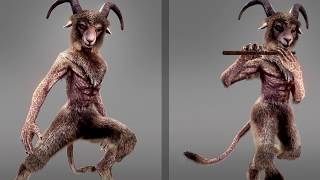
An issue that we ran into while creating the game was how to animate the character’s faces. To solve this issue we had to options, to rig the characters faces, or to use morphs, also known as blend shapes. We decided to go with blend shapes and here is why.
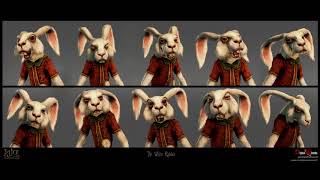
Blend shapes have both pros and cons, but for this particular project we strongly believe that it is the best option. Blend shapes have the advantage of being extremely precise since the 3D artist is able to see and create the influence a blend shape will have on the desired polygons. This is perfect for characters that have a low number of polygons like ours. If we used bones the weight maps would have been very challenging to create due to low polycounts on the face.
Pros and Cons
Blend shapes can also be mixed together resulting in new outcomes, and can be easily modified and created when needed. Unlike rigging, you can add new blend shapes to a finished character without causing problems to the end product.
We also decided to go down this path since it is easier to create blend shapes for non-human characters, than having to imagine where to place a bone and how it will move on a unique character’s face.
The down side of blend shapes is that they cost more computer resources then rigging.
When creating character facial expressions, we created a concept database of all the expression and vowel shapes we could have for the characters. From there we tried our best to copy the database and imagine how a non-human character would look when doing a certain type of facial expression and or talking.
Inside Unity
For reference we saw lots of movie clips of non-human CGI characters, and took notes of how the facial muscles and animations were created.
The only part of the characters face that is not controlled by blend shapes are the eyes. Because it is important to have the character’s eyes to look at important points in the game. We instead rigged the eyes and wrote a code to control where the eyes would look.
Inside of Unity, all the facial expressions and talking animations are placed onto a different layer from the body animation. This is so we can change animations of the face while having the same animation for the body.
Cinematic Scenes
For cinematic scenes in the game, we are using a facial motion capture that works with our blend shapes to get accurate acted scenes.



Comments